These results come from our simplified internal simulations, not official Design Arena evaluations. VLM preferences are not human votes; scores are interpreted within each comparison.
The question first came out of our own observations of Visual Code Generation evaluation. In recent years, large language models have made breakthrough progress in code generation, and visual code generation in particular has shown enormous potential. Models of the latest generation—represented by GPT-5.6 Sol, Claude Fable 5, and Kimi K3—can already generate HTML, SVG, and CSS directly to automate the construction of fully functional webpages, dynamic user interfaces (UI), and interactive data visualizations. This code-based generation path opens up a large imaginative space for automated design and front-end development.
Pairwise preference comparisons are one way to discuss the visual quality of generated pages, as illustrated by Design Arena: one prompt produces two results, and users pick the one they prefer. In practice, they lean toward whichever looks better and more finished.
But what exactly decides "looks better"?
We follow a concrete thread: make visual requirements explicit in design planning, observe how that changes asset use and page construction, and explore data filtering and distillation to encourage those behaviors under ordinary requests. We then use generated images as visual references before coding, while preserving the editable structure of the final artifact.
Visual richness may matter more than we assumed
Before making any argument, take a look at the results below—which side would you pick?
In these selected examples, we prefer the visual result on the left. The pairs illustrate differences in asset use under the same prompt and model. They are qualitative examples, not evidence of preferences across all tasks or users.
Look closely at the two sides and you will find the structure, layout, text, and data barely differ. What really opens the gap is that the right side leans on simple geometric blocks, gradients, and emoji as filler, so it still reads as a half-finished product; the left side, with richer visual assets, has a complete hero image, material quality, and atmosphere.
The model knows how to write code, but struggles to cross the gulf from "structurally correct" to "visually pleasing."
So a large part of what decides look and feel sits in the places code cannot draw. These examples suggest that asset acquisition may affect the look and feel of generated results, a possibility worth studying further.
We usually attribute "AI-written pages looking bad" to the model lacking taste, but a more direct explanation is this: HTML, SVG, and CSS are good at structural control and typography, yet not at hand-drawing complex visual assets. Cinematic backgrounds, 3D hero visuals, natural textures, intricate illustration—asking a model to paint these in code alone is not only expensive, it does not close the capability gap either.
Generation fills the asset gap of visual code
Next we discuss an agentic setup with tool access and a non-agentic setup that generates code in a single pass. These comparisons are our own simplified simulations, starting with the agentic setup.
What's missing is assets—so give it assets.
We can of course obtain assets through means such as web search, but today we want to discuss another path: using multimodal generative tools to directly fill in the visual content that Visual Code is missing. For tasks such as Web-Dev and poster generation, we mount a dedicated asset-generation tool built around image generation models, and we encourage the agent to reach for it more actively. The agent decides on its own when to call image, 3D, video, and other generative models, producing local visual assets that are hard to hand-draw in code.
We want to explore whether visual richness affects the first impression of a generated page. We selected a set of web-generation tasks and used a VLM to simulate an ordinary user in pairwise preference comparisons. This proxy can depend on the judge model and prompt; it is not equivalent to human judgment. The simulation uses the following prompt:
Act as an ordinary user seeing two anonymous web designs. Based on your first
impression, choose the result you prefer based on which looks better, feels
clearer, and is more appealing to use. Choose A or B, and use tie only when
you genuinely have no meaningful preference.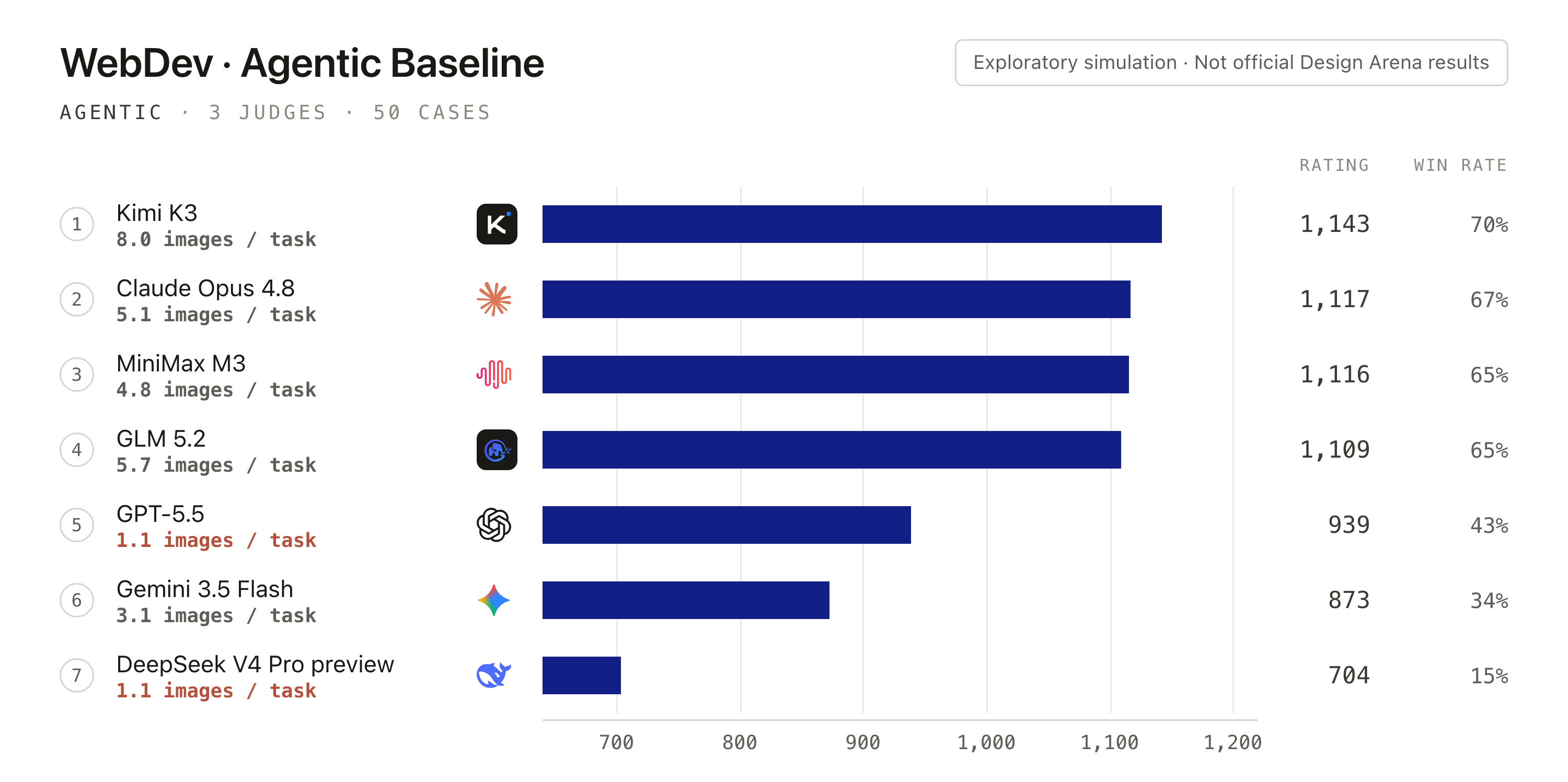
In this simulation, image-tool use varies across models. Configurations that use more visual assets also receive higher preference scores in some comparisons. This co-occurrence alone does not establish that generating more images causes better results: output quality, task selection, and judge preferences can all matter. It motivates studying when and why an agent uses tools, alongside whether those tools are available.
But we quickly found that mounting the tool does not mean the model will actually use it. It tends to keep working the way it always has—finish the structure first, then fill the page with gradients, shadows, and color blocks. It rarely stops to think, "this region should actually be an image."
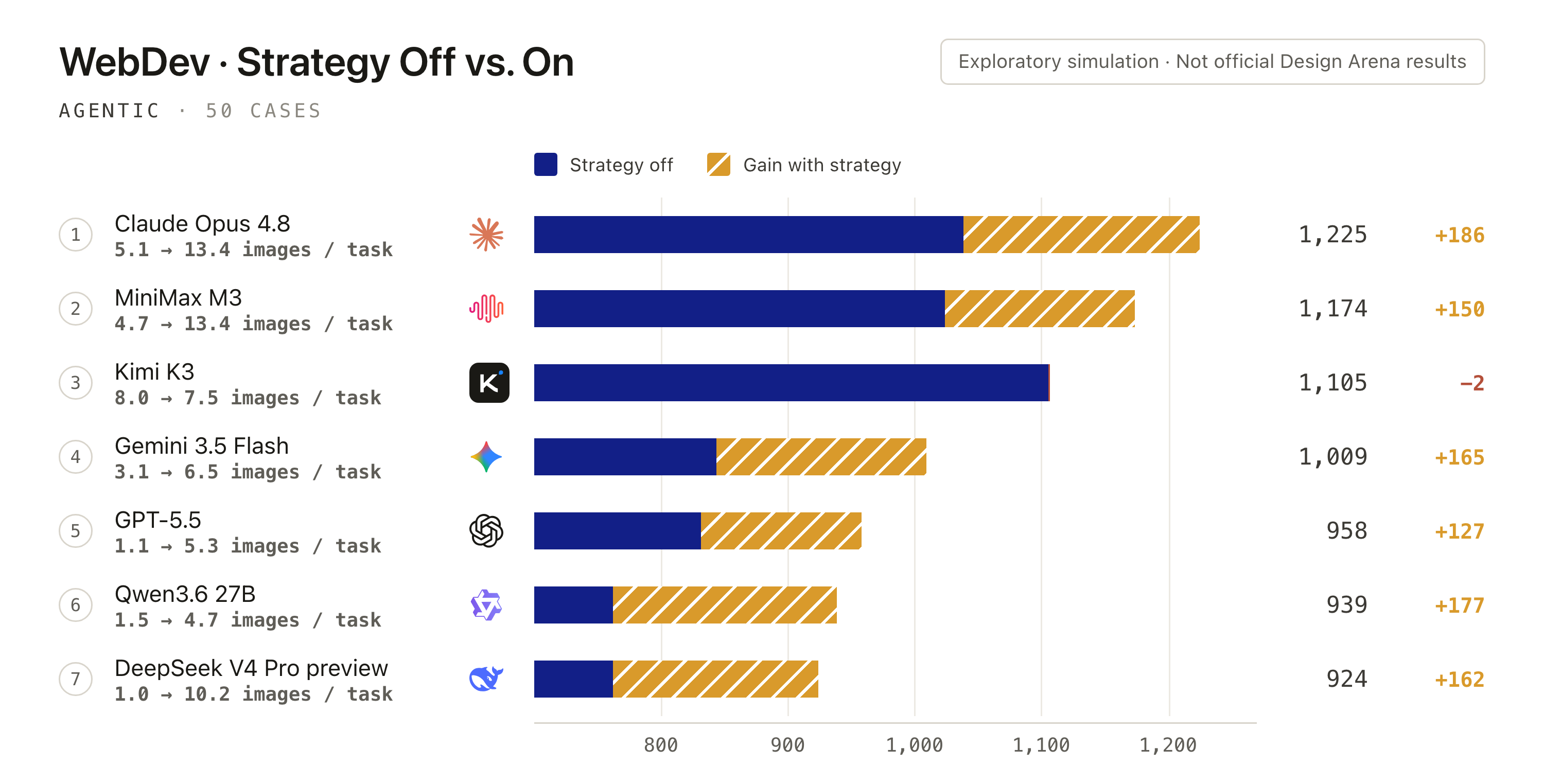
So we added a step to the design phase: first generate a design.md. Alongside functionality, content, and layout, the agent considers which regions need a focal image, background, illustration, or texture, and how those assets work with text and information hierarchy. For dynamic pages, the plan can also specify content entrances, scroll reveals, hover feedback, and state transitions, so motion and interaction serve the overall design. Code and asset generation follow once that direction is clear.
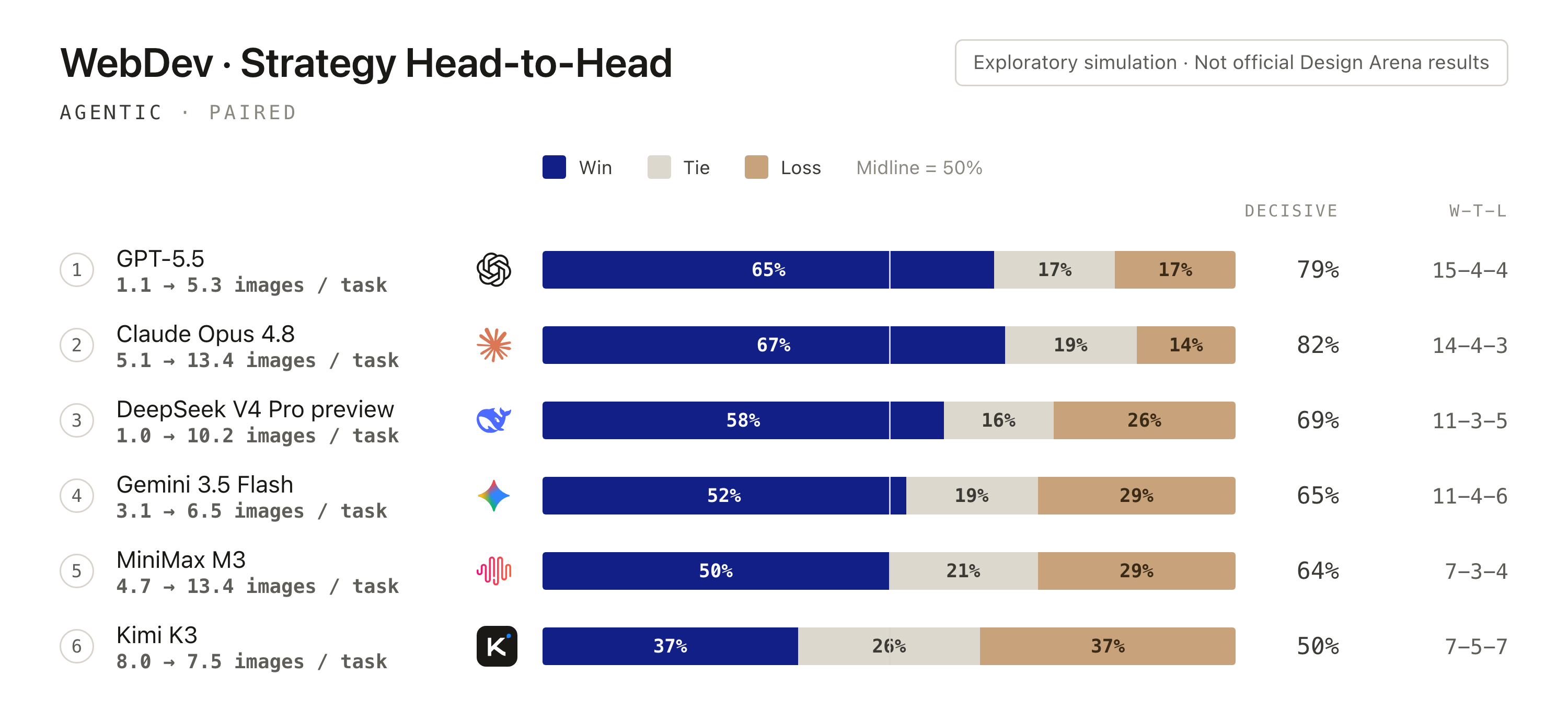
It looks like a small change, but it actually reorders how the agent creates: first work out what the picture needs, then decide how to realize it. In the examples we inspected, some outputs appeared more complete after this step was added. Most importantly, the agent became far more willing to call image generation models. In the results below, models that had previously shown little interest in image tools—GPT-5.5 and DeepSeek V4 Pro preview among them—received a higher simulated preference rate under the same prompts in this setup; the observation still needs more complete evaluation.
Distilling design behavior from design.md
The earlier observations led to a further question: can the design decisions in design.md become part of a model's default page-generation behavior? We explore context distillation with a concrete design plan as the starting point, organized into four steps:
Write the design plan: turn the brief into
design.md. Start from the page's content and use case. Specify the focal image, information hierarchy, reading order, typography, whitespace, and section proportions, giving the subsequent implementation a concrete design direction.Plan assets and motion together: give the page a distinct expression. Describe where photography, illustration, or texture belongs and how it works with the palette, text, and layout. Where useful, plan entrance sequences, scroll reveals, hover feedback, and state transitions so visual assets and the dynamic experience work together to guide attention.
Generate from the plan, then curate the pages. Guide Qwen-3.6 27B with
design.mdand asset suggestions to generate complete pages. Check whether the results address the original request and whether image URLs are valid; filter or rewrite unsuitable samples. Retain implementations that express the design intent through HTML, CSS, and JavaScript as training targets.Distill design decisions into default generation behavior. Train on the original user request paired with the selected page code, omitting the
design.mdused during sample generation from the training input. The aim is for the model to learn to organize layouts, choose assets, and arrange interactions from ordinary requests—making where assets belong, how information unfolds, and how interactions respond more natural generation choices.
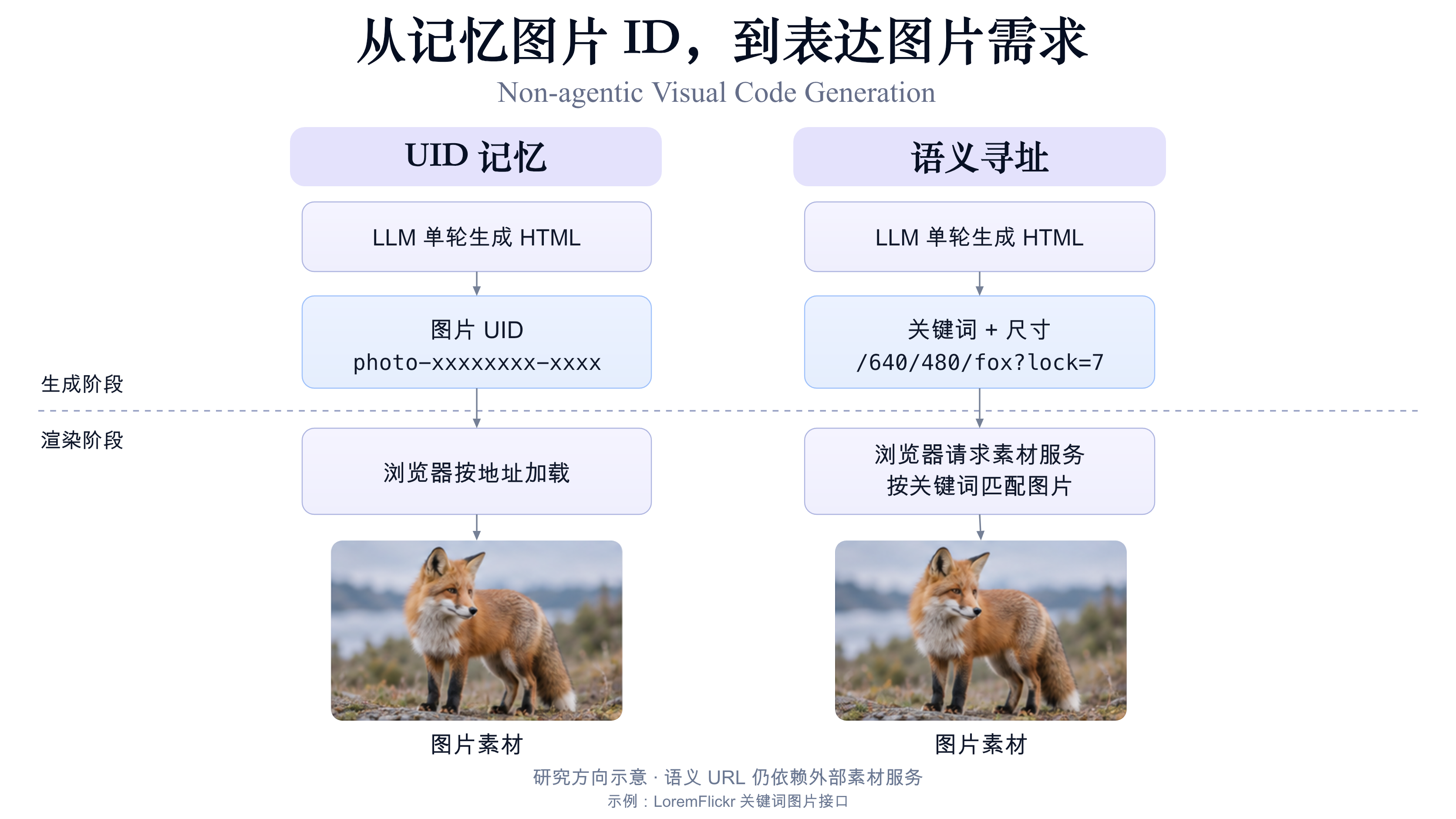
In the non-agentic setup, the model emits HTML, CSS, and JavaScript in a single pass. The resulting page can contain motion and interaction, although the model does not call search or image-generation tools during generation. It can write external image URLs for the browser to fetch when the page loads. In some samples we observed Unsplash IDs such as photo-xxxxxxx-xxxxxxx; this image-ID usage pattern has also attracted discussion. With design planning and asset suggestions, some models, including Qwen-3.6 27B, became more inclined to use these image resources.
For seed prompts we drew on SamuelBang/AesCode-358K, collecting roughly 100K web-related entries and sampling and deduplicating them with reference to Design Arena's What people are building with AI categories, yielding 20K prompt samples. Image IDs were the entry point for this exploration; the broader habit of interest is selecting and organizing assets to suit the page's content.
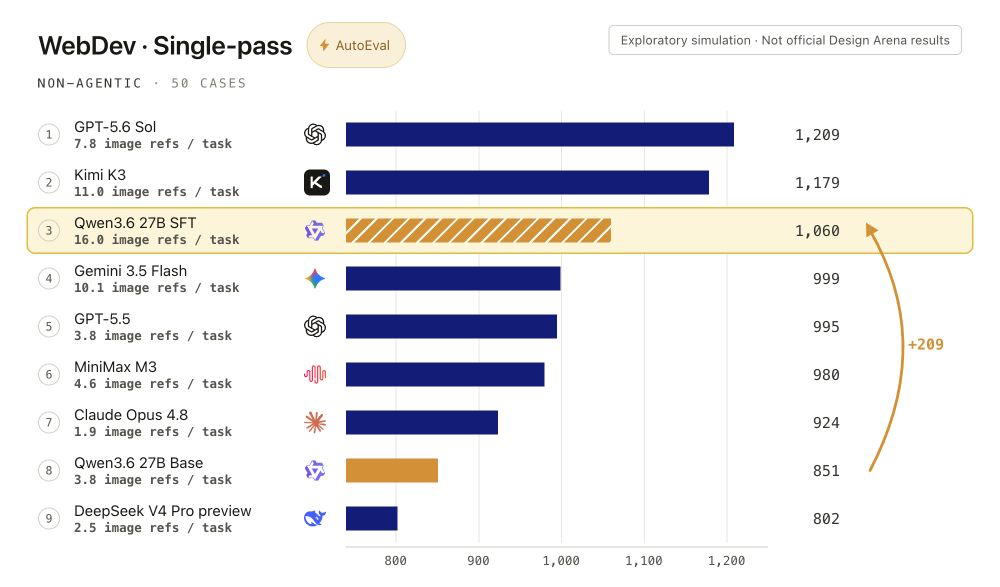
We also check image-UID validity and rewrite generated samples. This exploratory sample set records a decline in page-level broken-image rate from 17% to 3%, reflecting a change in asset-loading quality. In the simplified simulation below, the context-distilled version also references images more often and receives a higher simulated preference score.
For non-agentic web generation, one direction worth exploring is semantic addressing: the model states what the image needs to be—keywords, dimensions—and an external asset service matches an image at render time. LoremFlickr, for example, matches and returns an image from the keywords and size in the URL, so https://loremflickr.com/640/480/fox?lock=7 requests a 640×480 image related to the keyword "fox." The model only has to write that address into the HTML; when the browser loads the page, LoremFlickr returns the image and it appears in place. The model still generates HTML in a single pass, while training can focus more on choosing assets that fit the content, style, and layout—and depend less on memorizing arbitrary image UIDs.
Generation as visual imagination
In a world where Coding Agents dominate nearly every task, multimodal content-generation tools seem able to embed cleanly into visual content creation as well, helping LLMs move faster toward becoming productive generative tools.
Adding multimodal tools did raise the visual richness of the Web-Dev content a Coding Agent produces. But we ran into another problem: today's code models still badly lack control over the picture as a whole.
They are fluent in syntax, the DOM tree, and Flexbox, yet they have no stable two-dimensional spatial sense or visual intuition. Asking a model to write front-end code directly tends to yield the highly templated "big headline, cards, rounded shadows" kit. This shows up most on tasks like posters that lean on professional design: the model knows how the code should be written, but not how the picture should look.
Looking across visual generation today, research mainly follows two orthogonal paths, each with its own "lopsided" weakness. On one side is "left-brain" pure code generation—today's Coding Agent is like a system with only a left hemisphere: strong on logic and structure, yet because code is essentially a one-dimensional symbol sequence, the model lacks two-dimensional spatial sense and aesthetic intuition. On the other side is "right-brain" visual content generation (e.g. diffusion models), which compresses centuries of artistic prior and can instantly produce frames with top-tier composition, light, and material quality; but it has a fatal structural blind spot—without rigorous logic, the generated raster image is inherently unreliable for text accuracy, multi-layer layout, data charts, and later editability, and cannot serve as a real engineering deliverable.
Inspired by the World Action Model (WAM) strategy, we place an image generation model upstream as the Coding Agent's "visual world simulator," and treat the LLM as the later action decision-maker for Visual Code. Concretely, before writing code, the agent first calls an image model to produce a concept image, establishing aesthetic priors for composition, lighting, and color atmosphere—"imagine first, then act."
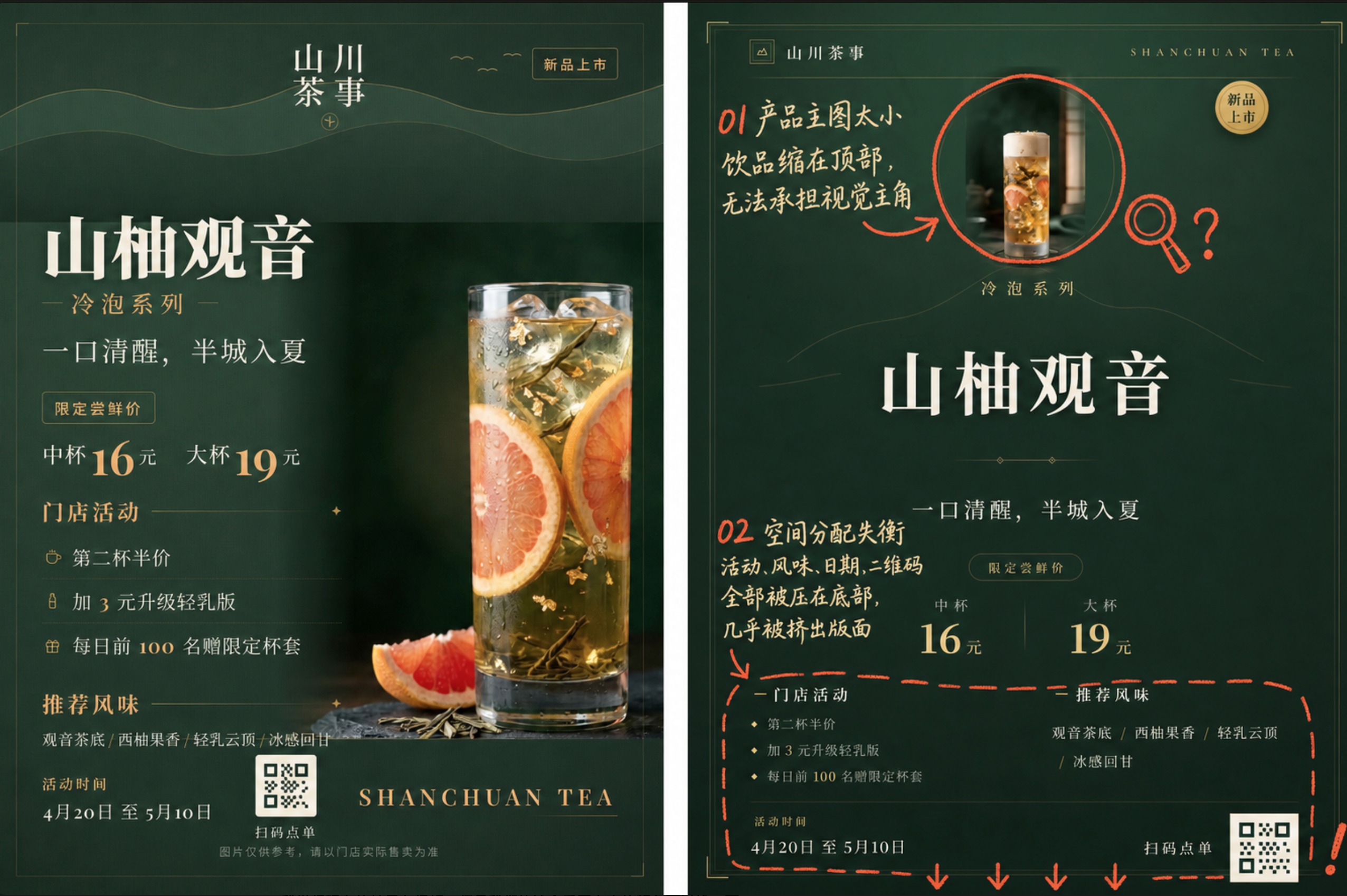
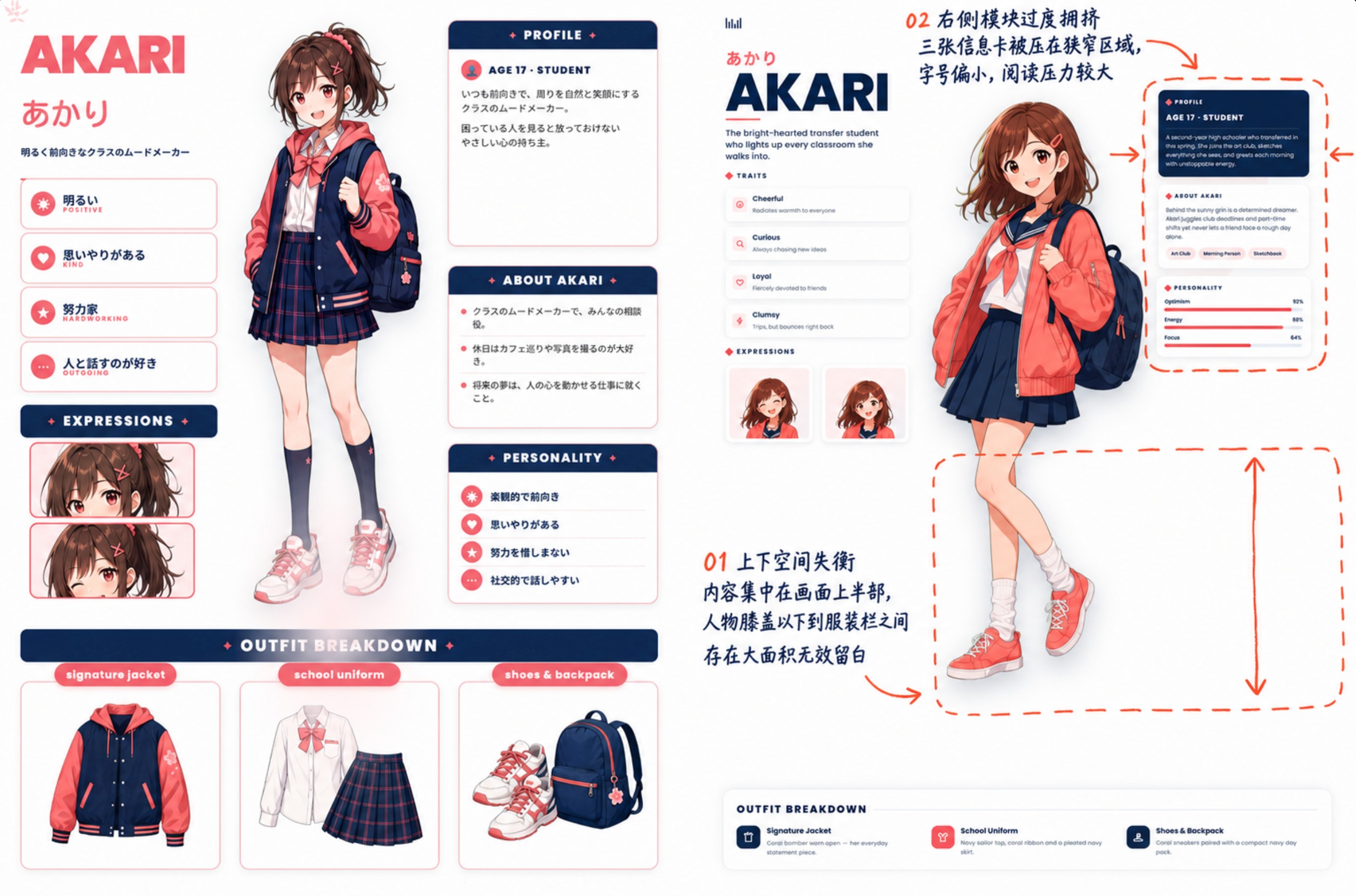
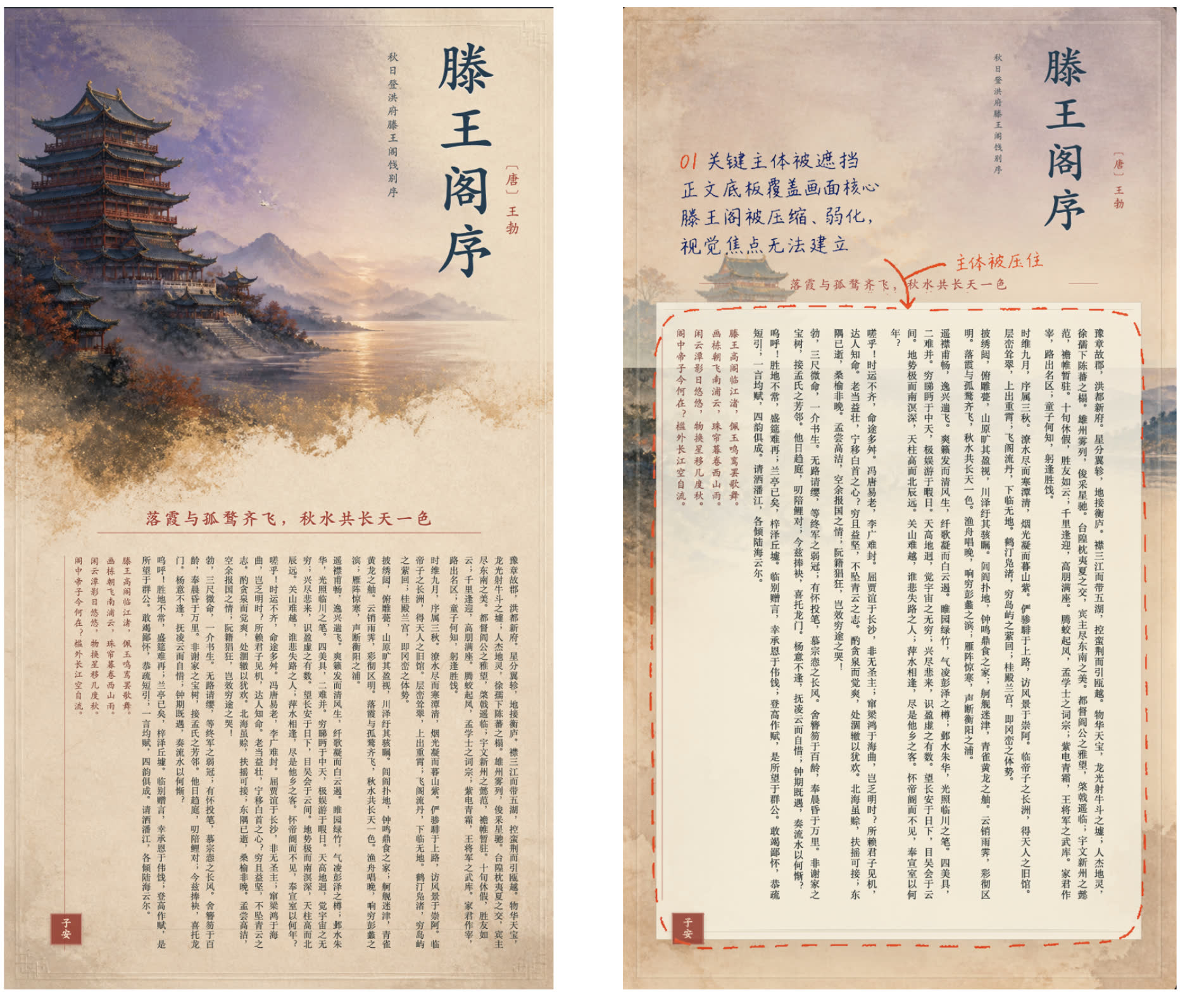
"Aesthetics" is a prior that is extremely hard to quantify in words, yet easy to make concrete in an image. Letting the agent first "see" a possible design direction, then write real content and editable structure, is far more reliable than asking it to write blindfolded.
In the exploratory simulation below, configurations with a visual reference receive higher relative scores, with a recorded preference split of 63% vs 37% in the poster comparisons. This gives us a direction worth exploring further for the “imagine first, then act” approach.
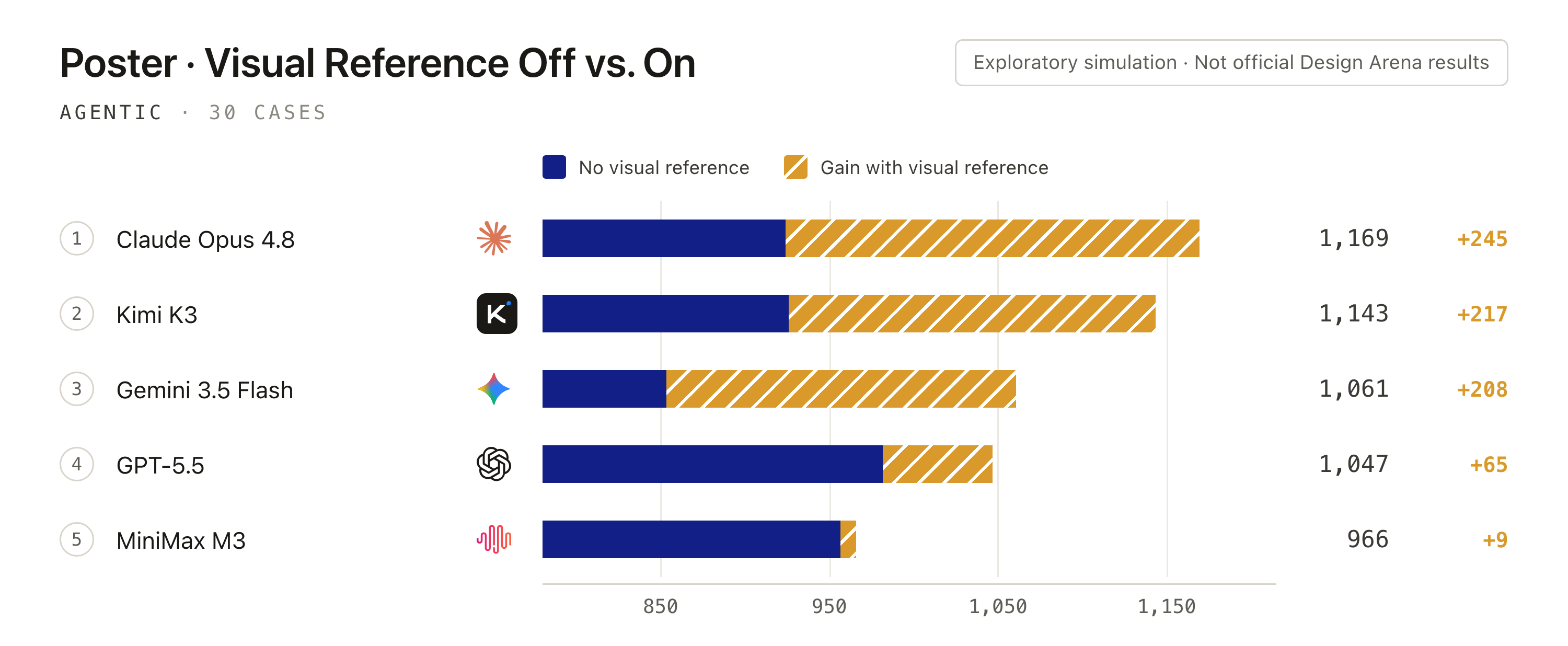
There is an interesting contrast here. In the past, when multimodal research explored "generation for understanding," pixel-generation noise often interfered on rigorous math and logic tasks; in Visual Code Generation, by contrast, image generation may feed back into the model's structural understanding and layout decisions. In other words, the image here is not only a final asset—it can also become part of how the model thinks through a design.
Visual Code as a new medium for content creation
Today, creative design and content generation with models such as GPT-Image-2 and Seedream 5 pro have already become a daily workflow for many creators. But we think Visual Code Generation also has the potential to become a new medium for content creation.
This brings us back to a point we have long emphasized in GenClaw: what Visual Code changes may not only be whether a page looks good, but the form of the creative deliverable itself. Today, most multimodal creation ends at a raster image. Once that image is delivered, its text, layers, and layout are essentially fixed. Artifacts produced by Visual Code—HTML, PPTX and the like—are editable by nature: text is accurate, layers stay under control, and what users receive is not an image that can only be remade as a whole, but a draft they can keep revising. We packaged this path into a Skill you can use directly—Editable-Design.
The results below make this clearer:
Compared with methods that emit pixels directly, such as GPT-Image-2 and Seedream 5, the visual content Editable-Design produces lets users freely drag elements, rewrite text, and replace image assets. For posters, infographics, and other tasks that need repeated fine-tuning, this matters a great deal. If one image asset needs replacing, a single image-model call can swap it locally, without scrapping the whole piece and starting over.
Finally, on how to use it. GenClaw-Next is itself a model-agnostic, framework-agnostic Agent Harness—not tied to a particular LLM provider, nor to a particular framework. Editable-Design ships as a Skill on top of it, aimed at hosts such as Codex and Claude Code, so anyone can try it out directly.